



How many ports are sufficient? It depends on how you utilize your gadgets. With laptops, desktops, and even tablets losing traditional connections in favor of slimmer designs, customers confront a difficult task: balancing convenience and connectivity. Whether you’re connecting several screens, charging multiple devices, or transferring data, having the correct number—and type—of ports may greatly improve your everyday tech experience. Understanding your genuine demands helps you eliminate clutter and maintain a seamless workflow. This post will help you evaluate and optimize your port configuration.
Understanding Device Ports: Types and Functions
Common Port Types and Their Uses
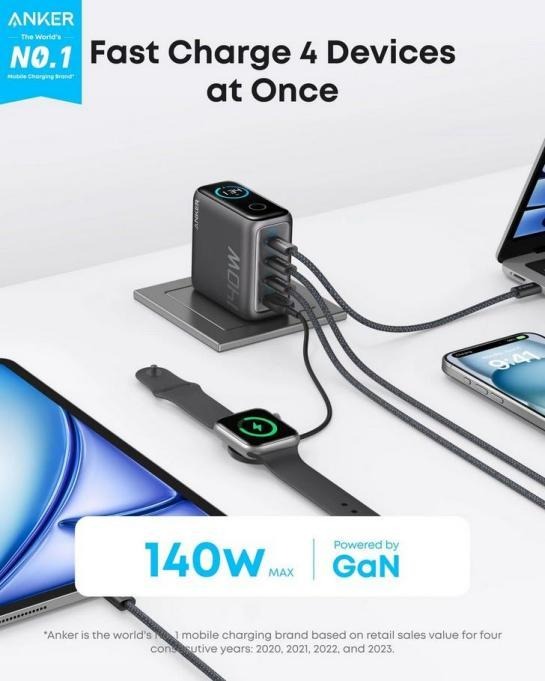
The most popular ports on current devices are USB-A, USB-C, HDMI, Ethernet, audio jacks, and SD card readers. USB-A supports older peripherals, but USB-C is preferred for its speed and adaptability. HDMI links external screens. Ethernet offers steadily connected internet. Audio connectors handle headphones or microphones, and SD slots control camera memory cards. These ports provide device expansion, data transmission, charging, and communication. Understanding each type of job allows you to choose equipment that complements your profession and lifestyle. Pairing your system with a USB charger that supports different port types, such as Anker’s 4-Port 140W PD 3.1 device, is essential.
Evolution of USB and Thunderbolt Standards
USB has advanced from the sluggish USB 1.0 to today’s high-speed USB 4, which supports data speeds of up to 40Gbps. Thunderbolt, built by Intel, tracks this progression, with Thunderbolt 4 currently allowing twin 4K monitors and rapid data transmission via USB-C ports. Both standards emphasize speed, adaptability, and power delivery. USB-C brings these standards together under a single connection, simplifying device interoperability. Many current gadgets now depend only on USB-C or Thunderbolt connectors, which reduces size while enhancing capability. High-performance usb chargers, like Anker’s PD 3.1-enabled model, are crucial for keeping up with the demands of newer interfaces without compromising speed or safety.
The Role of Ports in Modern Devices
Ports provide a connection between your device and the outside world. They enable peripherals to connect, electricity to flow, and data to be sent. As laptops thin down, manufacturers limit the number of ports, choosing USB-C for its all-in-one functionality. Nonetheless, many users depend on several peripherals—external displays, disks, or speakers—which necessitates intelligent port management. Devices like the Anker Laptop Charger (140W, 4-Port, PD 3.1) make this easier by combining the power supply and various connections. Such solutions allow experts and power users to remain productive without lugging additional equipment. The proper port configuration results in fewer dongles, smoother performance, and improved overall device usefulness.
Assessing Your Port Requirements
Home and Office Setup Needs
A typical home or office setup can contain a laptop, printer, external display, keyboard, and mouse. These normally need at least four ports: HDMI or DisplayPort for displays, USB for input devices, and perhaps Ethernet for reliable internet access. A USB charger with several high-speed connections keeps computers and phones fueled without requiring separate power bricks. Hubs and docking stations consolidate connections in common locations, which reduces cable clutter. Evaluating how often you connect and unplug devices helps you estimate your desired port count and whether permanent or flexible solutions are better for your workstation.
Gaming and High-Performance Demands
Gamers and high-performance users often want more ports to accommodate extra GPUs, numerous monitors, fast storage, and connected peripherals. USB-C and Thunderbolt connectors have become crucial due to their speed and power. A typical configuration can include HDMI for displays, USB-A or C for keyboards, mouse and headsets, and Ethernet for lag-free gaming. A high-output USB charger, such as Anker’s 4-Port 140W option, keeps everything fueled up throughout intensive workouts. Because gaming equipment tends to use more power, choosing a charger with real-time power monitoring and smart temperature management minimizes overheating and keeps your equipment operating safely and effectively.
Professional and Creative Workstations
Ports for SD cards, external storage, displays, and input devices like tablets are essential for creative workers like photographers, video editors, and designers. These workstations often need reliable connectivity, a power source, and quick data transfer. HDMI, Thunderbolt, and USB-C ports are required. Power management is made easier with a USB charger, such as the Anker 140W PD 3.1, which has four ports and real-time monitoring. It ensures that all essential instruments get enough power simultaneously and reduces desk clutter. Since creative occupations need constant activity, having a reliable and effective charging solution may significantly increase productivity, especially when working on-site or remotely with limited power outlets.
Optimizing Port Usage and Expansion Options
Utilizing Hubs and Docking Stations
Hubs and docking stations enhance a device’s capabilities without requiring built-in ports. They convert one USB-C port into a variety of connectors, including HDMI, USB-A/C, SD card slots, Ethernet, and more. For laptops with few ports, this is a game changer. Docking stations are perfect for workplace settings, whilst small hubs are excellent for travel. When used in conjunction with a strong USB charger, such as Anker’s 140W model, both the host device and any attached peripherals remain charged. With support for numerous high-speed connections, you can retain both performance and ease. Investing in a solid hub guarantees that port limits do not impede your work.
Wireless Alternatives to Physical Ports
Wireless technologies decrease the requirement for physical connectors. Bluetooth links peripheral devices such as keyboards, mice, and speakers. Wi-Fi provides file transfers, online access, and even wireless displays using technologies such as Miracast and AirPlay. These tools are suited for transportable setups and minimalist workspaces. While wireless cannot totally replace wired connections for power-intensive or high-speed applications, it can dramatically reduce clutter in your environment. Devices such as the Anker 4-Port USB charger supplement wireless systems by effectively managing all your power requirements, enabling your wireless devices to concentrate on performance. Choosing wireless choices allows customers to declutter their surroundings without losing functionality or connection.
Future-Proofing Your Setup
Getting ready for development is part of future-proofing. Devices are moving toward faster, fewer ports, especially Thunderbolt and USB-C. Since newer technologies need more power, purchasing high-wattage, multi-port chargers, like the Anker 140W PD 3.1, offers long-term use. There is no need for frequent updates since these chargers work with a variety of gadgets and new standards. Seek for devices with a flexible output, global compatibility, and firmware update support. Over time, a setup gains value by adjusting to new peripherals, faster data standards, and clever features. You can save e-waste, save time, and stay ahead of the competition by making your plans in advance with flexible tools and chargers.
Conclusion
Understanding your port demands boils down to how you utilize your technology. Whether you’re a casual home user, a dedicated gamer, or a creative professional, selecting the correct ports and accessories makes all the difference. The Anker Laptop Charger (140W, 4-Port, PD 3.1) simplifies complicated installations with rapid charging, smart safety, and real-time monitoring. Using hubs, embracing wifi choices, and preparing for future technology can keep you productive and connected. The correct ports increase your productivity. With a little planning and the correct tools, you can create a simplified, future-ready digital environment that really works for you.